Stop managing samples.
Start playing them.
WeaveTone listens to every sample and every Ableton project you own, files each one by how it actually sounds, and turns that library into an MPC kit or an Octatrack chain in seconds. It runs on your machine, and it never touches your originals.
- Your folders
- ANALYSE
- Sample map
- BUILD
- Kit / chain
- Your hardware
Every sample you own, filed by how it actually sounds
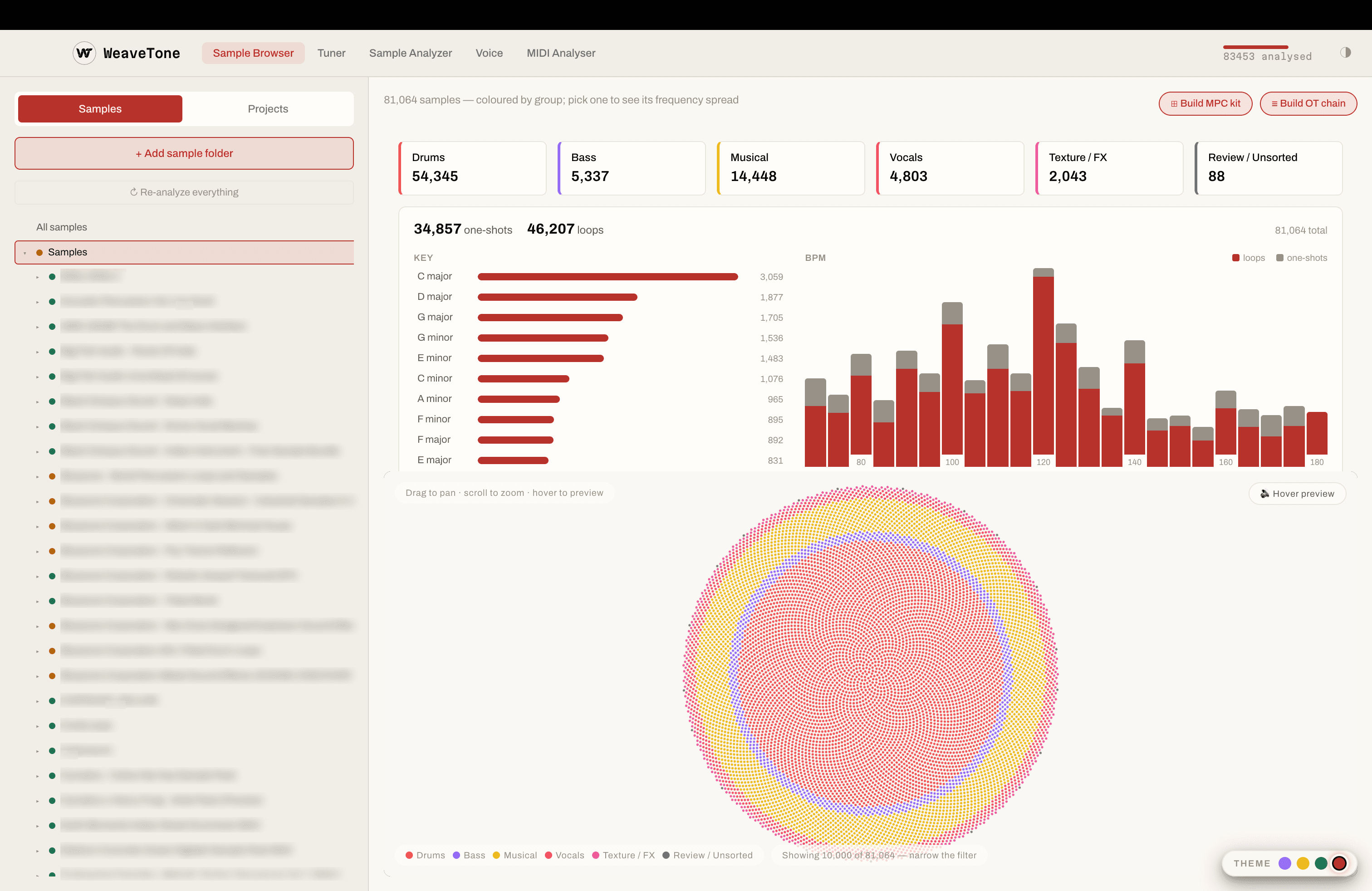
Point WeaveTone at a drive and it listens to each file rather than reading its name. Drums, bass, musical, vocals, texture and FX separate out on their own, with one-shots split from loops and a key and a tempo on everything. Anything it is not confident about goes to a review bin instead of being filed wrong.
- Six top-level groups — Drums, Bass, Musical, Vocals, Texture / FX, and Review for anything uncertain
- One-shot or loop, key, BPM and timbre computed for every file
- Key and tempo spread for the whole library, so you can see what you actually own
- The map lays samples out by how they sound — hover any point to audition it, no double-click roulette
- Scanning runs in the background, pauses when you need the CPU, and resumes where it stopped
- Local only. Nothing is uploaded, and originals are never modified
Open one sample and see exactly what it is
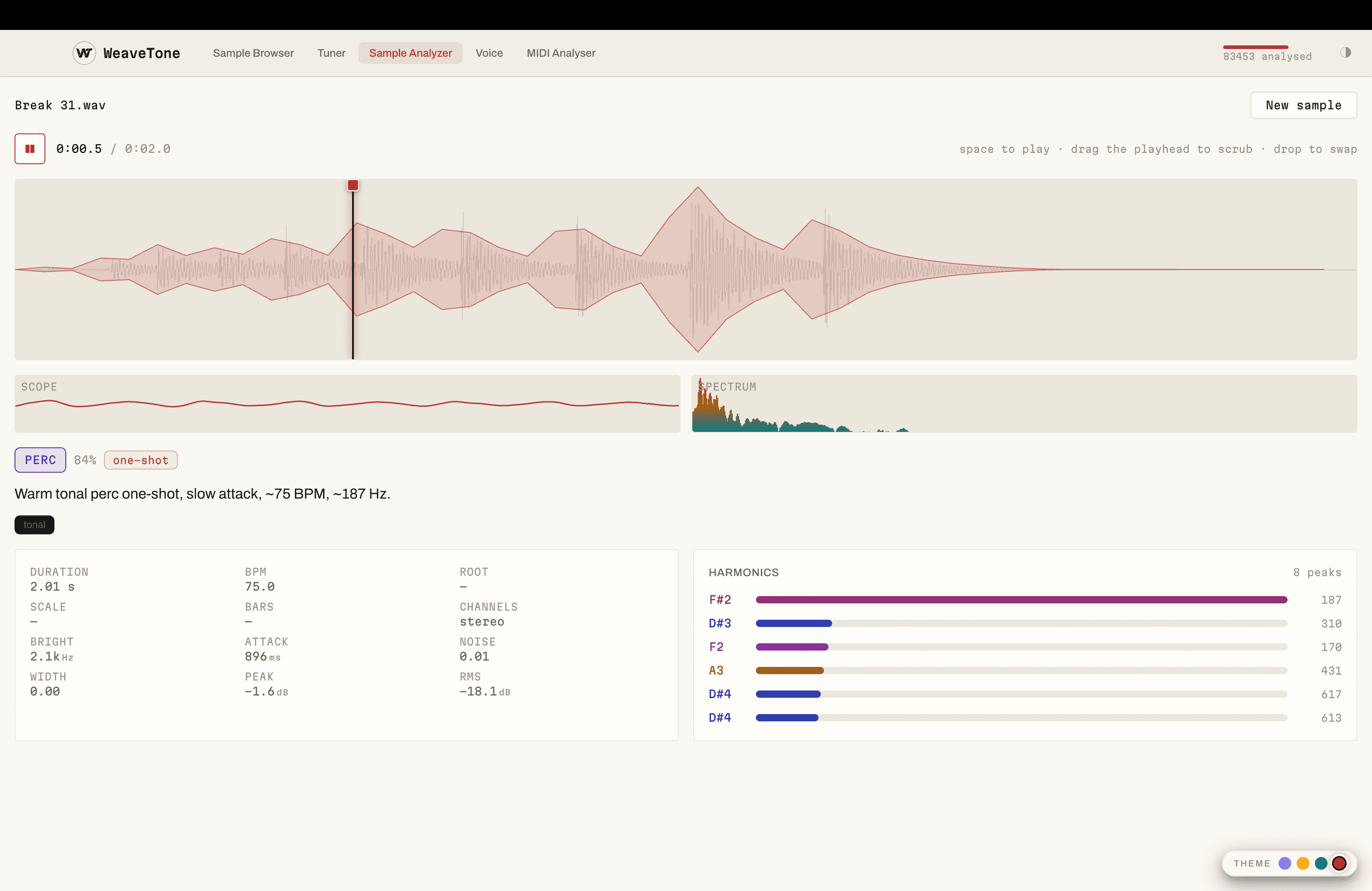
The analyser draws the waveform with its amplitude envelope over the top, so attack and decay are something you read rather than guess. Under it sits the measurement you would otherwise open three plugins for — and a plain sentence describing the sound, in case you only wanted the short version.
- Amplitude envelope over the waveform: attack, sustain and tail at a glance
- A one-line description in plain English — “Warm tonal perc one-shot, slow attack, ~75 BPM, ~187 Hz”
- Category with a confidence figure, form tag and character tags
- Duration, BPM, root, scale, brightness, attack, noise floor, peak, RMS and stereo width
- Harmonic peaks named as notes, strongest first
- Space to play, drag the playhead to scrub, drop another file in to swap
The samples in your unfinished projects are still good
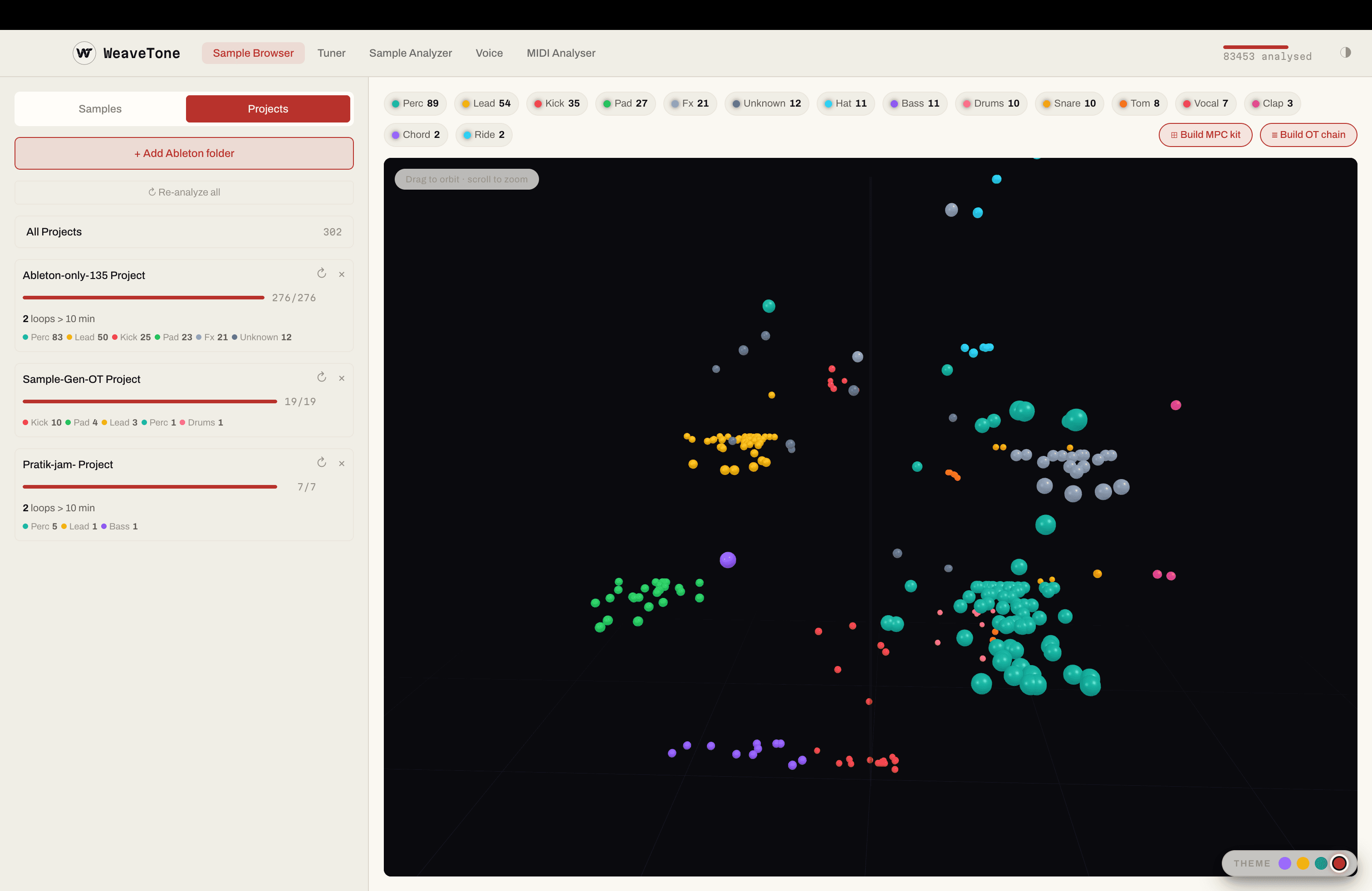
Add your Ableton folder and WeaveTone walks every project, pulls out the audio each one uses, and analyses it exactly like the rest of your library. Years of sets that never became tracks stop being dead weight and become a source pool you can build from — one project, or all of them at once.
- Point it at an Ableton folder; every project inside is read and its samples analysed
- Per-project breakdown by category, so you can see what a set was actually made of
- Long loops flagged, so a ten-minute bounce never sneaks into a kit
- Re-analyse one project or the whole folder whenever it changes
- Any project — or every project — becomes the pool a kit or a chain draws from
The slow part was never the music. It was the file admin.
Anyone who owns a sampler knows the routine: dig through folders you cannot see into, audition the same forty kicks again, convert the rate and the bit depth, stitch a chain by hand in an editor, name everything, copy it to the card, load it, find one sound wrong, and start again. That is the gap between your library and your hardware, and it is where the session goes.
- Where the hour goes
- With WeaveTone
- Auditioning blind across a library too big to hold in your head
- Hover the map and hear it
- Stitching a chain by hand and hoping the slice grid lands
- Typed, built, padded, sliced
- Filling a kit pad by pad from folders named 808_final_2
- A template and one press
- Checking rate and bit depth before every transfer
- Written at what the machine wants
- Old projects you never open again
- A pool you build the next kit from
WeaveTone collapses that hour into a few seconds, so the time goes into playing.
Type the chain you want. It is built before you have finished thinking about it.
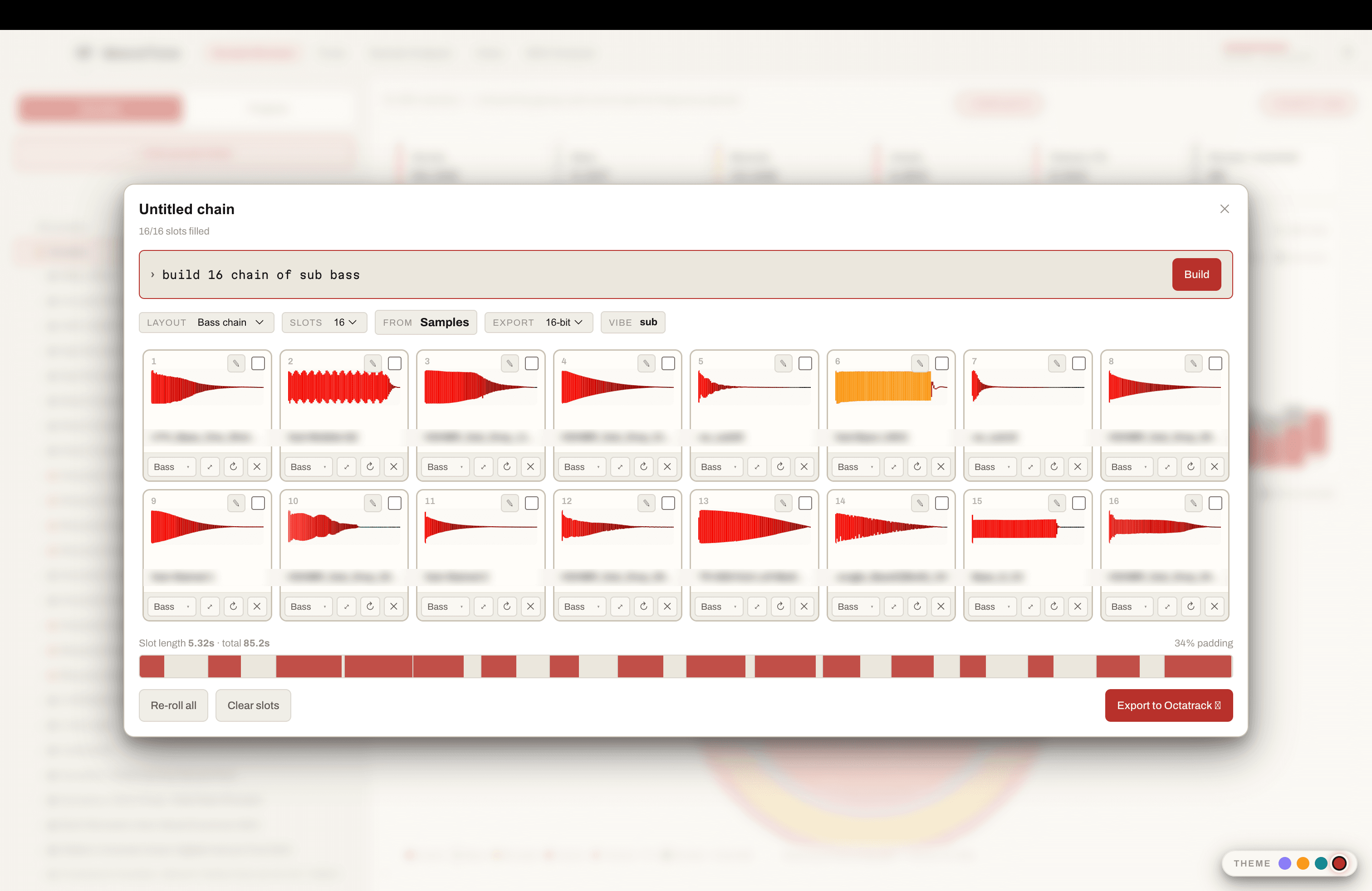
Choose the folder or project to draw from, type what you are after, and WeaveTone fills the slots from your analysed library. Every slice is padded out to the length of the longest one, so the Octatrack’s even slice grid lands on the start of each hit — and the .ot goes out beside the WAV with the exact slice points.
- “build 16 chain of sub bass” — plain words, searched against what you actually own
- 4 to 64 slots; layout, source pool, export depth and vibe all stay editable after the build
- Re-roll the whole chain, or swap, trim and audition any single slot
- Slot length, total length and padding shown before you commit — 5.32 s per slot, 85.2 s, 34% padding
- Flex machines load into RAM, so that readout is the cost: shorten the chain or drop to 16-bit and halve it
- Exports the chain WAV and a real .ot, at 16- or 24-bit, straight to the card
The Octatrack divides a chain into equal slices. Butt hits of different lengths together and the grid walks off them; pad each one to the length of the longest and every slice starts on a hit. The .ot is written alongside with the exact points either way.
A template, one press, sixteen pads
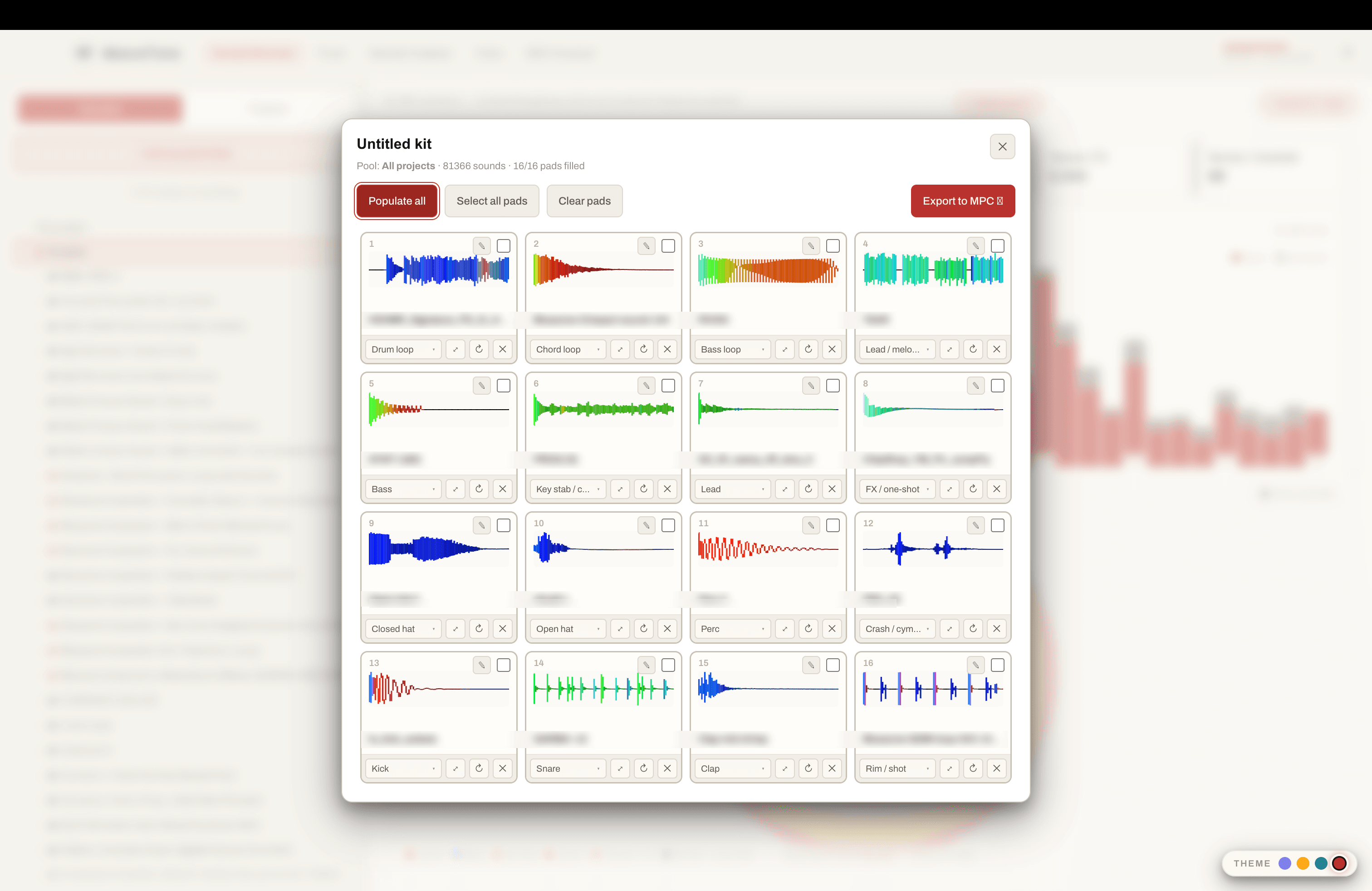
Say what each pad should be — kick, snare, closed hat, open hat, perc, bass, a chord loop — and press populate. Every empty pad pulls a matching sound from the pool. Re-roll the ones that do not sit right, trim a longer sample down on the pad itself, and export a real program that loads with every pad already mapped.
- Set a category per pad once; the layout is a template you reuse
- “Populate all” fills every empty pad at once, from a pool of tens of thousands
- Re-roll any pad you do not like without disturbing the fifteen that are right
- Trim a long sample on the pad — non-destructive, the source file never changes
- A frequency-coloured waveform on each pad, so you can read a sound before you hear it
- Pull from one folder, one project, or everything you own
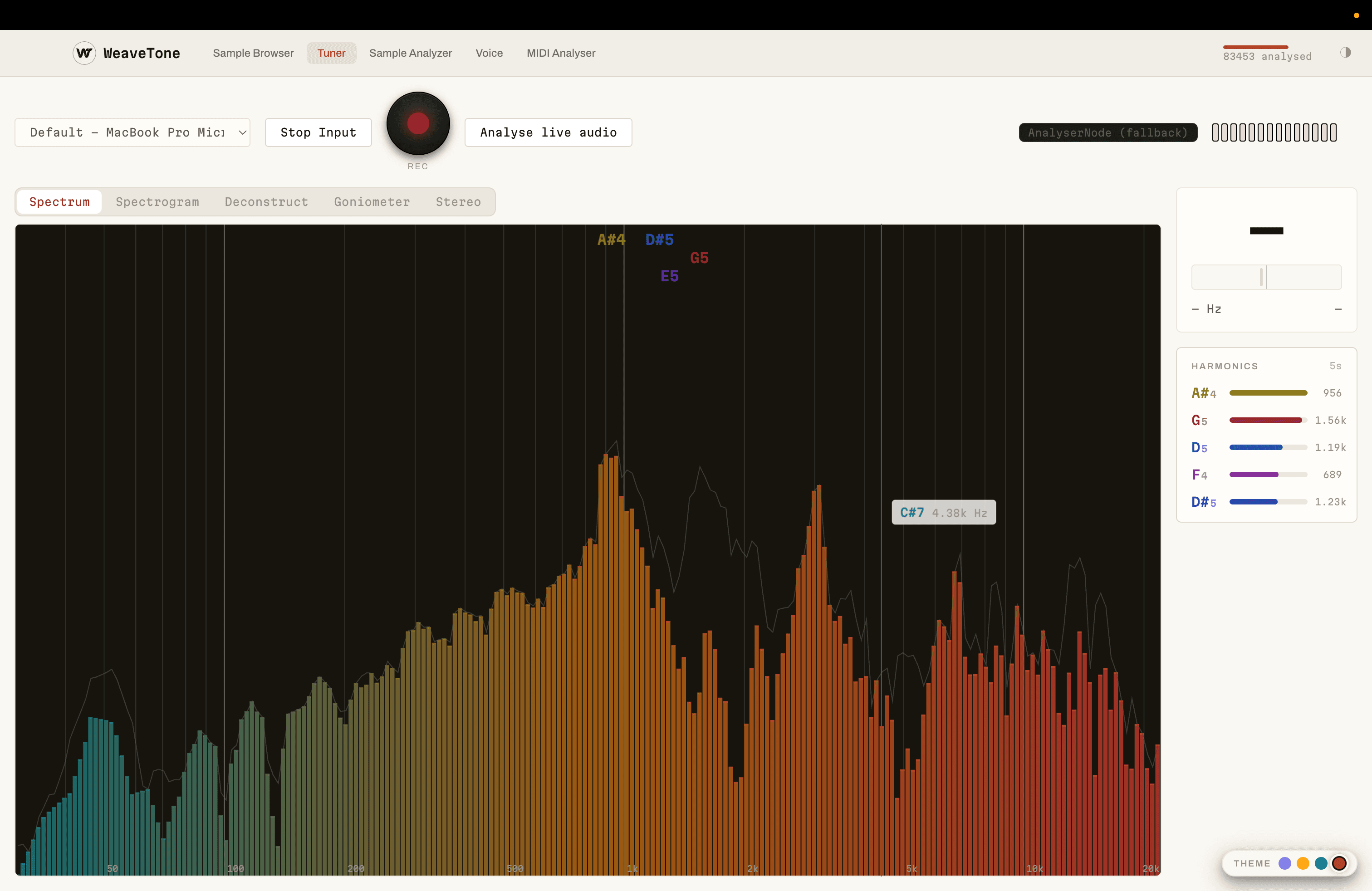
Hear a sound, then see why it sounds like that
The tuner takes live input or a file and shows you its spectrum with the strongest harmonics picked out and named as notes. It is the quickest way to find a fundamental before you tune something to it — and the quickest way to learn, over a few hundred sounds, why a bell is a bell and a saw is a saw.
- The top harmonics ranked, named as notes and given in Hz
- Spectrum, spectrogram, deconstruct, goniometer and stereo views of the same signal
- Analyse live audio off any input, or drop a file in
- Hover anywhere on the spectrum for the note and frequency under the cursor
Questions
The things worth knowing before you download it.
Does WeaveTone modify or move my original samples?
No. Originals are never written to, renamed or moved. A sample is identified by a hash of its contents, so it survives you reorganising your own folders, and everything you build is a reference until you export — at which point WeaveTone writes copies somewhere you chose.
Does my audio get uploaded anywhere?
No. Analysis runs on your machine. No sample, recording or export leaves it, and neither do your file names or folder paths. The first launch downloads the listening model; until that download has succeeded, classification uses on-device measurements and the full fingerprint is not available.
Which hardware can it export to?
AKAI MPC and the Elektron Octatrack today. MPC kits export as a real .xpm drum program with the WAV copies beside it; Octatrack chains export as one padded WAV plus a real .ot file holding the exact slice points. Both have been loaded on the hardware.
What does it need to run?
macOS, on Apple Silicon or Intel. It is a standalone application, not a plugin, and it does not need a DAW open.
How does it decide what a sample is?
It listens to it. An audio model gives each file a fingerprint and it is filed by what it sounds like rather than by what folder it came in, alongside measured key, BPM, and whether it is a one-shot or a loop. Anything the model is unsure about goes to a review bin instead of being filed wrongly, and one click corrects a label.
Can it read my Ableton projects?
Yes. Point it at a project folder and the samples inside your unfinished sets become part of the searchable library, so an idea you abandoned two years ago is a source pool rather than a folder you will never open.
Point it at your samples. Get a kit back.
WeaveTone is in active development on macOS. Leave your email and we'll reach out when it is ready to try.